

THE BOTTOM LINE
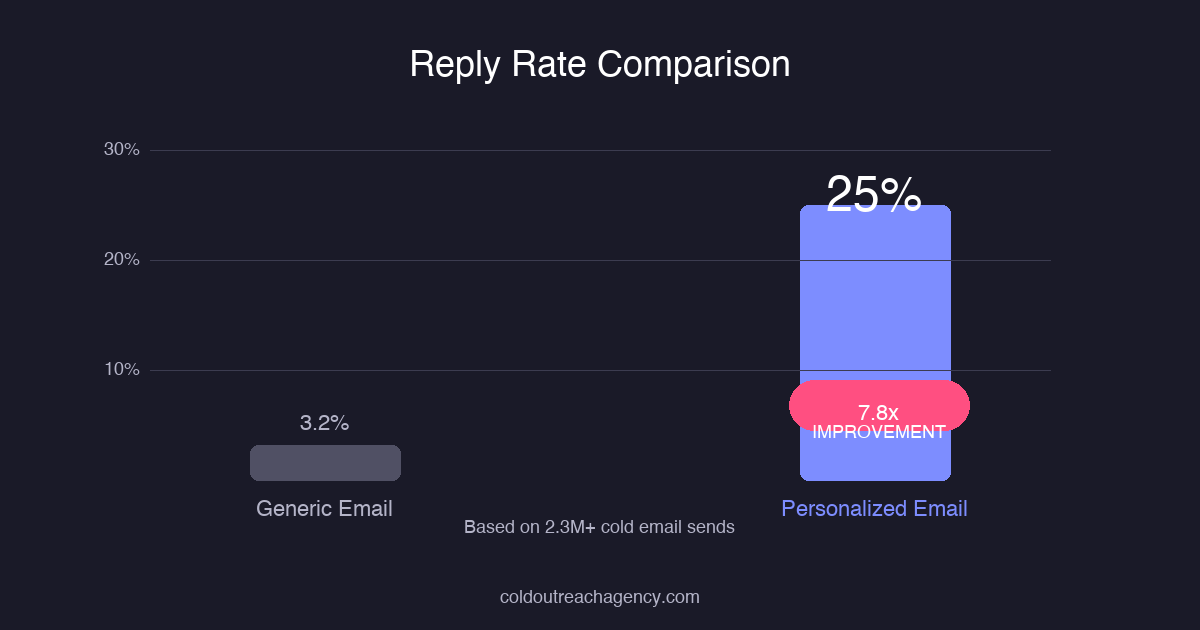
Generic cold emails average 3.2% reply rates. Personalization techniques in this guide push that to 18-27%. Our agency data across 2.3 million cold emails shows the difference between merge tags and real personalization is 5-8x higher reply rates. you don’t need to spam people. You need to make them feel like you wrote the email for them. Implementation takes 30-60 seconds per prospect with the right tools.
what’s Cold Email Personalization and Why Does It Matter in 2026?
The Hyper-Personalization Ladder: 7 Levels of Personalization
- Level 1 , Surface tokens: First name, company, job title. Everyone does this. Expect 0% lift.
- Level 2 , Context signals: Recent blog posts, LinkedIn activity, company news, mutual connections. Requires 2-3 minutes per prospect.
- Level 3 , Pain-point alignment: Reference a specific challenge their industry faces. Show you understand their world.
- Level 4 , Trigger-based: Event-based personalization tied to actions, announcements, or milestones. Highest response rates per effort.
- Level 5 , Hyper-personalization: Video, custom images, reference to specific content they created. Resource-intensive but 40%+ reply rates.
- Level 6 , Two-way personalization: Ask a question specific to their situation. Create genuine dialogue potential.
- Level 7 , Full AI synthesis: AI analyzes their entire digital footprint and generates unique value propositions per email.
How Do You Research Prospects for Personalization at Scale?
What Are the Best Trigger-Based Personalization Strategies?
- Hiring triggers: “I noticed you just hired a Head of Sales…” signals growth and budget availability.
- Funding events: “Congrats on the Series B…” indicates capacity to invest in solutions.
- Product launches: “Saw your new [product feature] launch…” shows category awareness.
- Content engagement: “Your LinkedIn post about [topic] resonated with me…” creates immediate connection.
- Tool adoption: “I see you’re using [competitor tool]…” enables direct comparison framing.
- Event attendance: “You were at [conference] too…” builds instant rapport.
How Do You Use Personalization Tokens Without Looking Like a Robot?
What Personalization Mistakes Kill Response Rates?
- Name typos: Always verify spellings. “Hi Johh” is worse than “Hi [first_name]”. This one seems obvious until it happens to you 47 times in one day.
- Outdated triggers: Congratulating someone on a job they left 8 months ago screams template. Use date filters on all trigger data.
- Generic observations: “Great content!” tells them nothing. “Your post on B2B pricing psychology was the clearest framing I’ve seen” proves you read it.
- Relevance mismatch: Commenting on their SaaS tool when you’re pitching HR software. Stay adjacent to your actual pitch.
- Over-personalization creep: Knowing their dog is name is impressive. Knowing their home address is creepy. Stay professional.
- Lazy personalization: First name + company name isn’t personalization. it’s tokenization. that’s a different thing entirely.
How Can You Scale Personalization Without Losing Quality?
- Segment-first, personalize-second: Build segments of 50-200 prospects. Personalize to the segment, not individual.
- Hook libraries: Create 20-30 pre-written hooks per trigger type. Mix and match based on prospect data.
- Research templates: Standardize AI prompts for consistent 10-second output per prospect.
- Batch triggering: Monitor triggers daily. When 10+ prospects match, launch targeted campaigns.
- Queue management: Auto-prioritize high-trigger prospects to top of sending queue.
What Metrics Should You Track for Personalization Effectiveness?
- Reply rate by personalization depth: Track tokens used per email. More tokens should correlate with higher replies.
- Trigger-based vs. non-trigger reply rates: Quantify the lift from referencing real events. HubSpot research confirms this matters.
- Time-to-reply: Target under 48 hours for 80% of replies.
- Meetings per 1000 emails: Track by segment. We target 15-25 meetings per 1000 emails sent.
- Personalization ROI: Revenue minus base cost divided by research time investment.
The Personalization ROI Breakdown: Math You can’t Ignore
Frequently Asked Questions About Cold Email Personalization
{
“@context”: “https://schema.org”,
“@type”: “FAQPage”,
“mainEntity”: [
{
“@type”: “Question”,
“name”: “How long does it take to personalize a cold email?”,
“acceptedAnswer”: {
“@type”: “Answer”,
“text”: “With AI tools, 30-60 seconds per prospect for Level 3-4 personalization. Level 5 hyper-personalization (video, custom images) takes 3-5 minutes but generates 40%+ reply rates. Choose your level based on deal size. Larger deals get deeper personalization.”
}
},
{
“@type”: “Question”,
“name”: “Is cold email personalization legal under GDPR and CAN-SPAM?”,
“acceptedAnswer”: {
“@type”: “Answer”,
“text”: “Yes, as long as you’ve a legitimate business reason for the personalization, include an unsubscribe link, and don’t misrepresent who you’re. Personalizing based on publicly available LinkedIn data is legal. Buying hacked databases isn’t.”
}
},
{
“@type”: “Question”,
“name”: “what’s the best personalization tool for cold email in 2026?”,
“acceptedAnswer”: {
“@type”: “Answer”,
“text”: “No single tool does everything. We recommend a stack approach: LinkedIn Sales Navigator for prospect research, Clay or Instantly for enrichment, and your email platform for sending. The tool matters less than the system. Most people buy tools and never build systems.”
}
},
{
“@type”: “Question”,
“name”: “How many personalization tokens should you use per email?”,
“acceptedAnswer”: {
“@type”: “Answer”,
“text”: “We recommend 3-5 personalization elements per email. Too few (1-2) feels generic. Too many (8+) feels robotic and desperate. The sweet spot is 3-5 well-placed, relevant personalization touches that feel natural in the email flow.”
}
},
{
“@type”: “Question”,
“name”: “Does personalization work for every industry?”,
“acceptedAnswer”: {
“@type”: “Answer”,
“text”: “Yes, with adjustments. B2B personalization is more accepted than B2C. Technical industries appreciate deep research. Creative industries respond to personality. These techniques work across SaaS, fintech, healthcare, legal, manufacturing, and professional services.”
}
}
]
}
The No-Fluff Repair Plan
If Cold Email Personalization Techniques feels inconsistent, the problem usually is not effort. It is that the campaign has no operating logic behind it. That is why I care less about volume at the start and more about whether the first replies prove the angle is real.
The inbox is not a neutral place. It is a triage system. Buyers delete anything that feels like it was written for a spreadsheet, not a person. The first job of outreach is to prove relevance before persuasion. Name the business problem, make the next step useful, and remove every sentence that sounds like a brochure.
The Quality Gate
- ICP match: The buyer should match your best customer profile, not just a broad industry label.
- Trigger strength: A hiring move, new location, funding event, tech change, compliance push, or public initiative makes outreach feel timely.
- Follow-up logic: Every follow-up should add a new reason to respond. Repeating the first message is not follow-up. It is noise.
Most campaigns do not need a cleverer subject line first. They need cleaner segmentation, sharper proof, and a follow-up sequence that sounds like a person is paying attention.
The cleaner version is simple: start with 300 accounts, not a giant scraped list. Segment them by pain, write one message for one segment, and watch replies before scaling. If that first batch does not produce signal, more volume will not save the campaign. It will only make the failure louder.
The hard truth: Cold Email Personalization Techniques is not magic. It is a disciplined system for reaching the right buyer with the right proof at the right time. Build the data layer first, then the message, then the follow-up system. In that order.
Where This Campaign Needs Judgment
The buyer is filtering for relevance, timing, credibility, and the cost of paying attention. Look at Cold Email Personalization Techniques through the buyer’s day, not through a marketer’s checklist. For Cold Email Personalization Techniques, that means the outreach has to connect the business problem, the buying moment, and the proof in a way that feels specific.
A rates accounts buyer cares about different proof than a spamming pipeline buyer. A placement issue needs different copy than a routing issue. A campaign built around rates, techniques, and spamming accounts has more context than a generic pitch. This is why shallow templates fail. They flatten different buyer situations into one bland message.
- Reply Pipeline: Review reply pipeline against the buyer’s real context before increasing send volume.
- Reply Buyers: Review reply buyers against the buyer’s real context before increasing send volume.
- Authority: Review authority against the buyer’s real context before increasing send volume.
- Operator: Review operator against the buyer’s real context before increasing send volume.
- Benchmark: Review benchmark against the buyer’s real context before increasing send volume.
- Market: Review market against the buyer’s real context before increasing send volume.
This is the part a generic article usually misses: judgment. A real operator can tell when authentication is the problem, when positioning is the problem, and when the whole angle is too soft. That judgment comes from reading replies, checking account quality, and comparing message intent against actual buyer behavior.
The cleaner move is to run a small batch, inspect the signal, then rewrite the weak layer. Do not scale because the copy looks polished. Scale because the replies prove the market understands the value.
