Cold Email Deliverability Checklist 2026: The 15-Point Inbox Shield Framework for 95%+ Inbox Placement
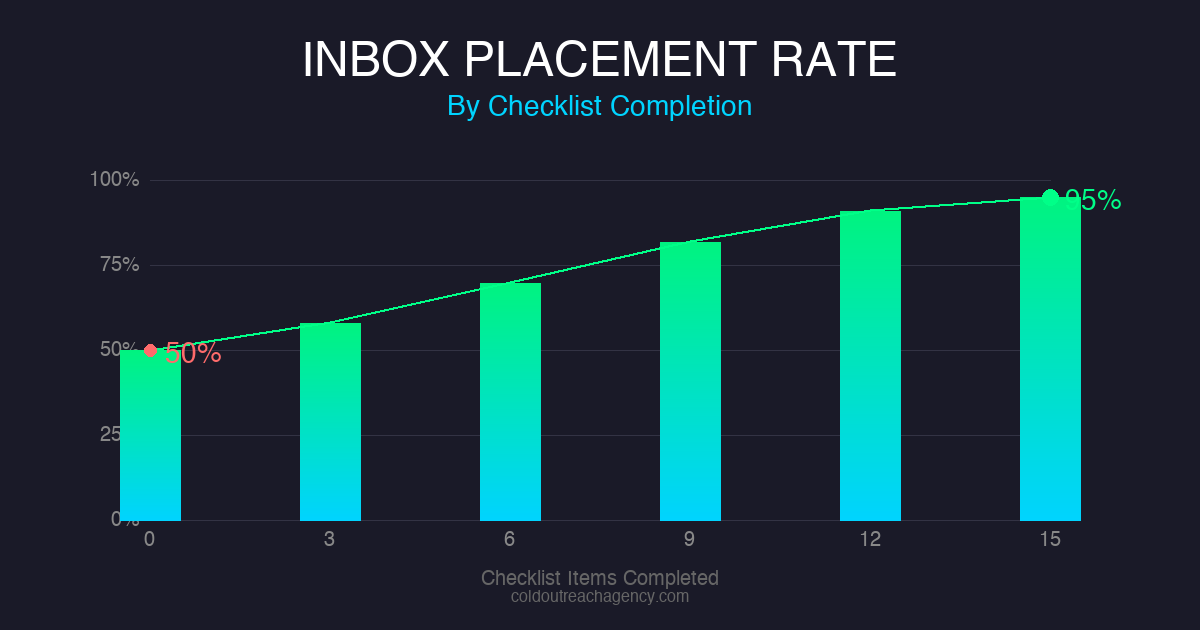
THE BOTTOM LINE: Follow these 15 checkpoints and you’ll hit 95%+ inbox placement. Skip them and your emails vanish into spam before anyone reads them. Domain setup, authentication, warmup, sending practices, content, monitoring, recovery, and maintenance work together as a system. Every piece matters. Two hours of setup prevents $234,000/year in lost revenue from spam filtering.
Why Does My Cold Email Land in Spam?
Domain Setup Checklist: The Foundation of Your Sender Reputation
- Use dedicated domains for cold outreach , Never touch your primary business domain. We use separate domains for every client campaign. This isolates reputation damage if problems occur. Learn why dedicated domains matter for your campaigns.
- Age domains for 30+ days before sending , New domains have zero reputation. Inbox providers treat fresh domains with suspicion. We warm up every domain for a full month before sending a single cold email. Patience here saves headaches later.
- Register domains for 2+ years , Short registration periods signal spam risk. Legitimate businesses renew their domains. Spammers abandon them. We always register for multiple years.
- Match sending volume to domain age , A 30-day-old domain should send 10 to 20 emails per day maximum. We scale gradually over 90 days. This mirrors natural business growth patterns.
- Use .com and .io extensions , These perform better than .net, .co, or country code domains. Inbox providers have historical data on these TLDs that helps with placement decisions. We avoid obscure extensions entirely.
What Email Authentication Records Do I Need?
- Set up SPF record , SPF (Sender Policy Framework) authorizes your sending servers to send on your behalf. List every IP address you send from. Missing IPs create authentication failures. We use MXToolbox SPF checker to validate our records.
- Configure DKIM signature , DKIM adds a cryptographic signature that proves email origin. Most cold email platforms generate these automatically. We verify DKIM is working before sending anything.
- Publish DMARC policy , Start with “p=none” to monitor without enforcement. Move to “p=quarantine” after validating everything works. We track DMARC reports monthly using Google Postmaster Tools.
- Verify MX records , Your domain needs to receive emails, not just send them. We check MX records using MXToolbox to confirm proper configuration.
- Test with GlockApps seed testing , Before launching any campaign, we send test emails to GlockApps seed addresses across Gmail, Outlook, Yahoo, and corporate domains. This shows exactly where emails land. GlockApps has saved us from many embarrassing launches.
How Long Does Email Warmup Actually Take?
- Start at 5 to 10 emails per day , Day one. Personal, conversational emails only. We write warmup emails that ask questions and spark replies. The goal is engagement.
- Increase by 20% weekly , Slow growth mimics natural business scaling. We follow this schedule: 10, then 12, then 14, then 17. Any faster triggers suspicion.
- Reach 50+ warmup contacts , These contacts must reply consistently. We use Mailchimp warmup features and tools like Lemwarm to automate positive signals.
- Continue warmup parallel to sending , Even at target volume, we dedicate 10% of capacity to warmup. This keeps reputation growing.
Sending Practices Checklist: Volume Rules That Keep You Out of Spam
- Send from dedicated IPs only , Shared IPs carry baggage from other senders. We never share IPs with unknown senders. Dedicated IPs give you complete control over reputation.
- Limit to 30 to 50 emails per domain daily , Most cold email platforms recommend this ceiling for new domains. We stay at 30 for the first 60 days, then move to 50 with proper monitoring.
- Space sends over 6 to 8 hours , Human senders don’t blast 50 emails in 5 minutes. We schedule sends throughout the day using SendGrid and similar tools that support timing controls.
- Rotate sending hours by target region , B2B audiences in Europe check email at different times than US audiences. We match send windows to time zones.
- Clean your list every 30 days , Hard bounces above 2% signal list quality problems. We use ZeroBounce for email validation before every campaign launch. Bad contacts get removed immediately.
What Content Signals Trigger Spam Filters?
- Remove spam trigger words , Delete: “free”, “guarantee”, “act now”, “limited time”, “winner”, “congratulations”. We audit every email against common spam word lists before sending.
- Keep subject lines under 50 characters , Long lines get truncated. Truncated lines look suspicious. We test subject lines using GlockApps spam analysis before campaigns launch.
- Include plain text version , HTML-only emails look automated. Every email we send includes readable plain text that mirrors the HTML version.
- Text-to-image ratio 80/20 , Images over 20% signal bulk marketing. We keep images minimal or nonexistent in cold emails.
- Personalize with recipient data , Generic emails die. We insert company names, industries, or specific pain points. Personalization shows research and value.
How Do I Monitor My Email Deliverability?
- Track bounce rates weekly , Hard bounces above 2% signal list quality problems. We investigate immediately when bounces increase.
- Monitor open rates by domain , Gmail vs Outlook vs corporate domains each behave differently. We segment our metrics to spot domain-specific problems.
- Check blocklist status monthly , We use MXToolbox Blacklist Check to verify we’re not listed. Getting listed happens fast. Recovery takes months.
- Use seed email testing weekly , We send test emails to Gmail, Outlook, and Yahoo accounts before every major campaign launch.
- Track spam complaint rates , Above 0.1% triggers penalties from Google and Microsoft. We keep it near zero through targeting and relevance.
what’s the Fastest Way to Recover From Email Blacklisting?
- Identify all blacklistings immediately , Use MXToolbox Blacklist Check to see every listing. Some blacklists don’t send notifications. you’ve to check manually.
- Stop all sends from affected domains , Continuing to send amplifies your spam signal. We take affected domains offline immediately and route traffic to backup domains.
- Submit delist requests to each blacklist , Most blacklists have removal forms. Follow their specific requirements exactly. We document every submission and follow up weekly.
- Audit your practices for root causes , Find why you got listed. Bounces, complaints, content issues. Fix the problem before relisting or you’ll get listed again.
- Wait for cooling period, then warmup again , Most blacklists require 30 to 90 days of clean sending before removal. We warmup from scratch every time.
Maintenance Checklist: Keeping Your Inbox Placement Strong Long-Term
- Rotate domains every 90 days , Fresh domains maintain reputation. We cycle domains before degradation becomes a problem. Our domain rotation strategy keeps campaigns running for years.
- Update authentication records when adding tools , Every new sending tool needs to be added to your SPF record immediately. We maintain a running list of all sending sources.
- Test deliverability monthly with seed emails , We track inbox placement rate over time. Patterns matter more than single data points.
- Maintain engagement rates above 25% , Reply rates and click rates signal value to inbox providers. We optimize for engagement, not just opens.
- Document all domain and authentication changes , We keep detailed logs for every modification. When problems arise, we’ve a complete history to reference.
Frequently Asked Questions About Cold Email Deliverability
The Practical Fix
If Cold Email Deliverability Checklist feels inconsistent, the problem usually is not effort. It is that the campaign has no operating logic behind it. If the list is weak, the message is vague, and the follow-up is random, even a smart idea turns into noise.
The buyer is not sitting around waiting for your pitch. They are dealing with inbox providers, skeptical buyers, and prospects who delete anything that feels copied. That means the message has to earn attention fast: clear pain, clean proof, and a next step that does not feel like a trap.
The Checks I Would Run Before Scaling
- Data: Are the names, roles, domains, and company signals verified? Bad data turns good strategy into inbox waste.
- Relevance: Does the message connect to a problem the buyer already cares about? Education is expensive. Recognition is faster.
- Measurement: Can we tell whether silence came from targeting, copy, timing, or deliverability? If not, we cannot improve the campaign intelligently.
The fastest way to diagnose the campaign is to read the replies. If people say wrong person, fix targeting. If they say not now, fix timing. If they say nothing, inspect deliverability and the first sentence.
The cleaner version is simple: start with 250 accounts, not a giant scraped list. Segment them by pain, write one message for one segment, and watch replies before scaling. If that first batch does not produce signal, more volume will not save the campaign. It will only make the failure louder.
The hard truth: Cold Email Deliverability Checklist is not magic. It is a disciplined system for reaching the right buyer with the right proof at the right time. Build the data layer first, then the message, then the follow-up system. In that order.
The Practical Operator Pass
Look at Cold Email Deliverability Checklist 2026 through the buyer’s day, not through a marketer’s checklist. If the message cannot show why this matters now, the campaign becomes background noise. For Cold Email Deliverability Checklist 2026, that means the outreach has to connect the business problem, the buying moment, and the proof in a way that feels specific.
A proof bottleneck should not be handled with the same CTA as a evaluation bottleneck. A campaign built around reporting, checklist, and point accounts has more context than a generic pitch. A market issue needs different copy than a bounce issue. This is why shallow templates fail. They flatten different buyer situations into one bland message.
- Placement Buyers: Review placement buyers against the buyer’s real context before increasing send volume.
- Attribution: Review attribution against the buyer’s real context before increasing send volume.
- Checklist Accounts: Review checklist accounts against the buyer’s real context before increasing send volume.
- Domain: Review domain against the buyer’s real context before increasing send volume.
- Enrichment: Review enrichment against the buyer’s real context before increasing send volume.
- Benchmark: Review benchmark against the buyer’s real context before increasing send volume.
This is the part a generic article usually misses: judgment. A real operator can tell when suppression is the problem, when positioning is the problem, and when the whole angle is too soft. That judgment comes from reading replies, checking account quality, and comparing message intent against actual buyer behavior.
The cleaner move is to run a small batch, inspect the signal, then rewrite the weak layer. Do not scale because the copy looks polished. Scale because the replies prove the market understands the value.