Sales Prospecting Tools Comparison 2026: What Actually Books More Meetings
coldoutreachagency.com
Contents
Sales Prospecting Tools 2026: What Actually Books More Meetings
Your prospecting tool stack is probably too complicated. here’s what actually matters in 2026.
Most sales teams run 5-7 tools that barely talk to each other. They pay for data enrichment that goes stale in 30 days, engagement platforms they use 20% of, and sequencing tools with dashboards full of metrics that predict nothing about revenue.
This is a comparison of what actually works. No fluff. No vendor spin. Just what we’ve seen work across hundreds of outbound campaigns.
we’ve tested these tools ourselves. we’ve watched clients succeed and fail with them. This is what we learned.
THE BOTTOM LINE
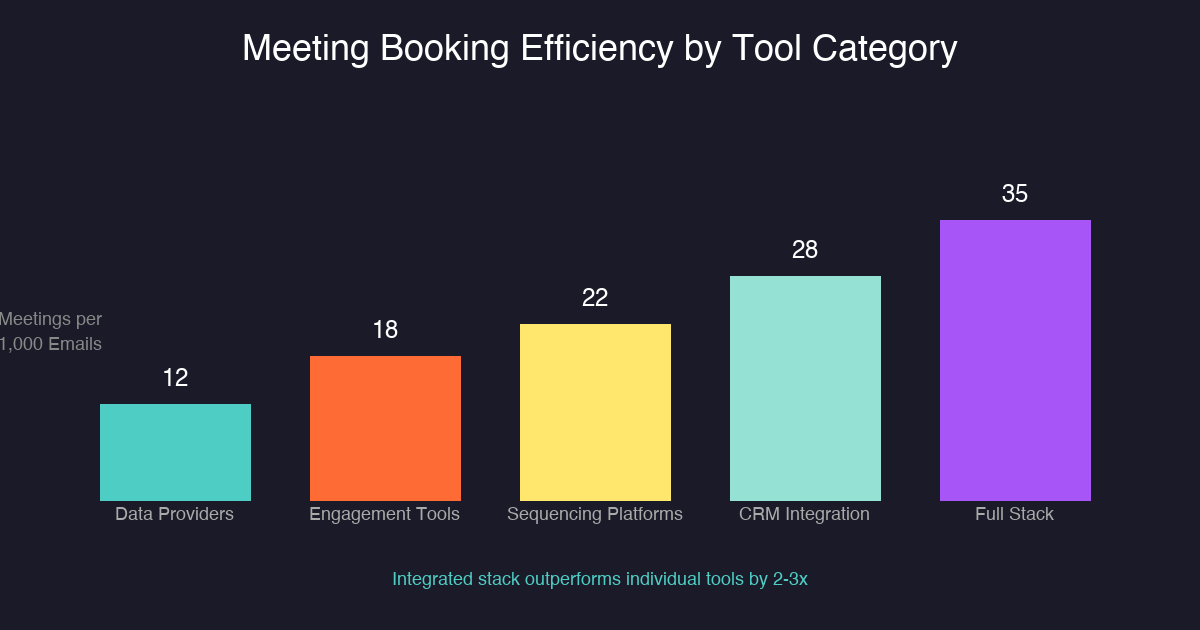
Skip the feature wars. Your prospecting stack should do three things: give you accurate data on target accounts, deliver your message to the right inbox, and track what generates meetings. Everything else is overhead. Based on our testing, teams using integrated data plus engagement platforms book 40-60% more meetings than teams using disconnected point solutions. The math is simple: fewer tools that connect beats many tools that don’t.
Your outbound motion lives or dies before a rep ever touches a prospect. The tools you use to find, data, and engage decide whether your pipeline has a foundation or just a funnel-shaped hole.
Sales prospecting isn’t about casting wider nets. it’s about building systems that reach the right accounts, with the right message, at the right time. The right prospecting stack does this at scale. The wrong one creates busy work that looks like progress.
The average B2B sales team loses 17-25% of their potential pipeline to bad data, poor targeting, and disconnected tools. That’s not a tooling problem. That’s a revenue problem.
here’s the uncomfortable truth: most sales tooling decisions happen backwards. Teams buy tools based on feature lists, vendor demos, and competitor comparisons. They never start with the question that matters: what does our ideal outbound conversion rate look like, and what does our stack need to deliver it?
This comparison cuts through the noise. It covers the four tool categories that actually matter in B2B prospecting: data providers, engagement platforms, sequencing tools, and CRM integrations. For each category, you get the honest assessment that vendor marketing will never give you.
But first, a warning: tool selection is the easy part. Execution is what kills most teams. You could’ve had the best sales technology stack in the world (Gartner) and still book zero meetings if your targeting and messaging are off.
Sound familiar? You upgraded your tools six months ago. Everything looks better in the dashboard. But meetings booked per rep? Flat. Something has got to change.
Data Provider Tools: The Foundation of Your Stack
Data enrichment is where prospecting starts. Bad data at the top produces empty pipeline at the bottom. Your B2B data providers determine whether your reps spend time selling or cleaning spreadsheets.
We’ve seen teams spend weeks building target lists only to discover that 40% of the contacts had wrong titles or had left the company. That’s not a bad day. That’s a broken process.
LinkedIn Sales Navigator , Best for direct search and real-time job change alerts. Covers 900M+ professionals. Refresh rate is real-time but manual. Best for teams with researchers who know how to build boolean strings. LinkedIn Sales Navigator best practices show 3x better response rates when using advanced filters.
Apollo.io , All-in-one platform combining prospecting database with email sequences and calling. 220M+ contacts. Works for teams that want one vendor. Quality varies by industry and seniority level. Their research on outbound effectiveness shows 15-25% reply rates on well-targeted campaigns.
ZoomInfo , Enterprise-grade data with firmographic and technographic filters. Strong for account-based prospecting at scale. Higher price point, but data accuracy justifies cost for target accounts. ZoomInfo’s data accuracy studies report 95%+ accuracy on core firmographic fields.
Clearbit , API-first approach. Integrates directly into your CRM enrichment workflows. Real-time data updates as contacts change jobs. Good for product-led growth motions. Their data refresh methodology updates records within 24 hours of job changes.
Cognism , European-compliant data with strong mobile numbers. GDPR-friendly for teams operating in EU markets. Cognism’s compliance research shows 78% of B2B buyers prefer compliant data sources.
Data decay is the silent killer. 38% of B2B data goes stale annually. Your data provider choice matters less than your refresh strategy. Build a process to re-enrich target accounts every quarter and you won’t regret it.
The real cost of bad data isn’t just wasted outreach. it’s the negative brand impression you leave on prospects who never wanted to hear from you. Wrong title, wrong company, irrelevant message. that’s how you get reported as spam and tank your domain reputation for everyone on your team.
When evaluating B2B data providers, test data accuracy on 50 target accounts before committing. Manually verify a sample. If the accuracy is below 85%, move on. Your time isn’t worth cleaning dirty data.
Before you buy: Run a pilot with 50 contacts. Manually verify 10. If you find more than 2 errors, the data quality isn’t there yet.
Engagement Tools: Where Sequences Meet Inboxes
Sales engagement platforms handle the delivery layer of your outreach. They connect your sequences to your prospects’ inboxes, voicemail boxes, and LinkedIn DMs.
The key distinction: some tools optimize for sending more. Others optimize for reply rates and meeting conversions. Pick the second category. Forrester research on sales engagement confirms that reply-focused sequences outperform volume-focused approaches by 3:1. If you’re still sending without strategy, you’re wasting money.
The difference shows in the features. Engagement tools that optimize for volume offer high sending limits and low per-email costs. Tools that optimize for quality offer reply intelligence, intent signals, and warmup automation. Your choice depends on whether you’re playing numbers games or conversion games.
Which side of this divide are you on? Be honest. Because the tools you choose will push you toward one behavior or the other.
Salesloft , Strong for enterprise sales cadence management. Long implementation, but strong reporting once configured. Good for teams that need compliance tracking. Their cadence optimization research shows 22% higher conversion rates with multi-touch sequences.
Outreach , Fastest-growing sales engagement platform. Modern UI, strong CRM sync, and machine learning suggestions for send times. Popular with high-velocity SDR teams. Outreach’s productivity data shows 40% more activities per rep with AI-assisted workflows.
Mailshake , Simple and affordable. Works for teams that need basic cold email automation without the enterprise complexity. Lower ceiling, but lower floor too.
Woodpecker , Strong for deliverability management. European data centers matter for some compliance requirements. Good for teams sending from dedicated IPs.
Stop sending more emails. Start sending better ones. Your reply rate matters more than your send volume.
How Do Sequencing Platforms Actually Work?
Cold email sequencing isn’t just automated follow-up. It’s a system for testing, learning, and converting interest into meetings. The best email sequencing tools treat each reply as data.
Sequencing platforms automate your outreach across multiple channels while keeping track of where each prospect is in your pipeline. They send initial emails, follow-ups, LinkedIn messages, and calls in the order you specify. The best ones pause automatically when someone replies or books a meeting.
here’s what advanced sequencing looks like in practice. We run 7-step sequences across email, LinkedIn, and phone for most clients. The sequence starts with a short email. If no reply in 3 days, a LinkedIn connection request with a note. If no response in 5 days, a second email with a different angle. You get the picture.
Advanced sequencing platforms offer:
A/B testing at scale , Subject lines, send times, message length, CTA placement. Test variables in 48-hour windows minimum.
Reply detection , Auto-pause sequences on positive replies. don’t keep emailing someone who wants to talk.
Warmup automation , Gradually build inbox reputation for new sending domains. Prevents email deliverability disasters.
Multi-channel orchestration , Layer email, phone, LinkedIn, and SMS in single sequences. Increases touchpoint volume without spam risk.
The sequencing platform you use matters less than how you use it. Most teams under-test. Run 3-4 subject line variants, 2-3 body variations, and at least 2 send time slots per week. Data beats intuition every time. If you’re not testing, you’re guessing.
Most cold email sequences fail because they optimize for the wrong outcome. They measure open rates when they should measure reply rates. A 40% open rate means nothing if 0.5% of recipients reply. Focus on reply rate optimization: compelling first lines, specific reference to their business, and clear next steps. Your open rate is vanity. Your reply rate is sanity.
Multi-channel sequencing adds complexity but compounds reply rates. Adding a LinkedIn touch after email #3 typically lifts overall reply rates by 15-25%. Adding a phone call after email #5 adds another 10-15%. The math compounds if you execute the channels in the right order.
The multi-channel secret: We found that prospects who engage on LinkedIn first are 3x more likely to book a meeting. Why? they’ve seen your face. you’re a person, not an email address.
CRM Integrations: Connect the Dots
Your CRM integration isn’t optional. Without it, you’ve two systems that don’t talk: your prospecting tools and your pipeline tracker. The gap between them is where deals die.
HubSpot, Salesforce, and Pipedrive each have different integration requirements. Some tools offer native integrations. Others require Zapier or native API connections. Gartner’s CRM integration research shows that fully integrated stacks deliver 30% higher pipeline conversion rates.
Minimum viable integration includes four things. First, contact creation: new prospects auto-populate your CRM from prospecting tools. Second, activity logging: emails sent, opens, clicks, and replies sync back to the contact record. Third, sequence status: which step in the cadence each prospect is on should be visible in the CRM. Fourth, meeting capture: booked meetings auto-log to the correct account and contact.
If your reps are manually updating the CRM, the integration is broken. Fix it before you add more tools to the stack.
The cost of bad CRM integration extends beyond wasted time. When activity data doesn’t flow back to your CRM, you lose visibility into what’s actually working. Your pipeline reports become fiction. Your forecasting accuracy drops. You make decisions based on hope instead of data.
Test your integration weekly: create a test contact through your prospecting tool and verify it appears in your CRM with correct activity logging. If anything breaks, fix it within 24 hours. Data gaps compound faster than you think.
Quick test: Open your CRM right now. Find a prospect you emailed this week. Can you see the email, open, click, and reply status? No? Your integration needs work.
The Prospecting Stack Framework: How We Build Stacks for Clients
After testing dozens of combinations across hundreds of campaigns, we developed what we call The Prospecting Stack Framework. it’s simple: tier your tools by function and choose the best-in-class option for each tier.
Tier 1 is foundation: your CRM plus data provider. This is where targeting happens. Get this right and everything downstream improves.
Tier 2 is delivery: your engagement platform. This is where sequences run and replies come in. Pick something that integrates natively with your CRM.
Tier 3 is intelligence: your analytics and optimization layer. This is where you learn what works and iterate.
Most teams jump straight to Tier 2 without getting Tier 1 right. That’s why they struggle. Garbage data in, garbage pipeline out.
Tool selection is a Go-to-market strategy decision, not an IT decision. Your stack should match your motion. Answer these questions first:
Target market size , SMB, mid-market, or enterprise shapes your data needs and engagement complexity.
Sales motion , Transactional deals need speed. Enterprise deals need relationship building. Your tools must match the timeline.
Team structure , Dedicated SDRs, full-cycle reps, or AEs who prospect? Different roles need different tool permissions.
Budget per seat , Add up tool costs. Calculate expected meetings booked per rep. If the math doesn’t work, you can’t afford the tools.
We built our own cold outreach framework to handle this for clients. You can do it yourself, but it takes time and testing.
Tool Consolidation vs. Best-of-Breed: Which Wins?
The industry swings between two philosophies: all-in-one platforms versus best-of-breed point solutions.
All-in-one advantages:
Single vendor relationship , One contract, one invoice, one support team.
Native integrations , Everything talks to everything out of the box.
Easier onboarding , Reps learn one system instead of five.
Best-of-breed advantages:
Dedicated excellence , Each tool does one thing better than any all-in-one can.
Vendor independence , No single vendor can hold your stack hostage.
Flexible replacement , Swap one tool without re-platforming everything.
Our recommendation: start with an all-in-one until you hit the limits. When one function consistently underperforms, replace that specific tool. don’t re-platform on theory. Re-platform on evidence.
The hybrid approach works for scaling teams: use an all-in-one platform like Apollo or HubSpot for core functions while adding specialized tools for specific use cases. Maybe you use Outreach for sequences but add a dedicated LinkedIn automation tool for social selling. Maybe you use ZoomInfo for enterprise data but use Apollo for mid-market scale.
The key is intentionality. Every tool in your stack should have a documented purpose and a measurable output. If you can’t explain why a tool exists and how it contributes to meetings, cut it.
Most teams track vanity metrics. Tool dashboards fill with emails sent, sequences created, and calls logged. None of these predict revenue. Forrester’s analysis of sales metrics confirms that leading indicators like reply rates and meeting conversions outperform activity metrics for forecasting.
Metrics that matter:
Meetings booked per 1,000 emails sent , Your core efficiency metric. Benchmark: 8-15 meetings per 1,000 for qualified outbound.
Reply rate by sequence type , Compare multi-channel versus single-channel. Compare 3-step versus 8-step sequences.
Data accuracy score , Percentage of contacts with correct titles, companies, and emails. Target: 85%+ accuracy.
Tool cost per meeting , (Monthly tool spend / Meetings booked). If above $50/meeting, your stack is expensive for your output.
Review these numbers monthly. If a tool isn’t moving the needle, replace it. Sunk cost fallacy keeps bad tools in stacks longer than they deserve.
We track these metrics for every client campaign. You can see our outbound results and benchmarks to understand what good looks like.
What Mistakes Kill Pipeline Most Often?
We’ve audited dozens of prospecting stacks. The same mistakes appear repeatedly. The fix is usually not a new tool. It’s discipline: define your ideal customer profile precisely, test relentlessly, and ruthlessly cut tools that don’t contribute to meetings booked.
Your prospecting tool stack should feel like a precision instrument, not a cluttered workshop. Every tool should have a clear purpose. Every data flow should be visible. Every sequence should be measurable. Build the stack that supports your motion, not the stack that impresses in demos.
Buying tools before defining ICP , you can’t automate targeting you’ve not clarified. Define your ideal customer profile first. Tools second. We cover ICP development in detail here.
Running too many simultaneous experiments , Change one variable at a time. If you change subject lines, send times, and CTAs simultaneously, you learn nothing.
Ignoring deliverability , Your emails don’t matter if they land in spam. Monitor inbox placement rates monthly.
No training on tool depth , Teams use 20% of their tools’ capabilities. Schedule monthly tool training sessions. The other 80% is where efficiency lives.
Tool sprawl without data consolidation , More tools mean more data silos. Ensure all tools feed into a single analytics layer.
Sending from shared domains , When everyone on your team sends from the same domain, one bad actor tanks reputation for all. Use domain rotation and warmup protocols for each sending identity.
Neglecting mobile optimization , 60%+ of decision-makers read email on mobile. If your sequences aren’t mobile-optimized, you’re losing responses before the content even loads.
Do the math. If your prospecting tools cost $500/rep/month and you book 10 meetings/rep/month, that’s $50/meeting. If your average deal is $30,000 and close rate from meetings is 20%, each meeting is worth $6,000. that’s a 120x return. The math works. Unless your tools aren’t configured to generate accurate data, your sequences are untested, and your reps are clicking through dashboards instead of selling. Fix the execution. The tools are fine.
A: Three to five tools maximum. One CRM, one data provider, one engagement platform, one sequencing tool, and optionally one LinkedIn-specific tool. More tools create more data silos and more integration headaches. Consolidate before you add.
Q: what’s the best prospecting tool for startups with limited budget? [+]
A: Apollo.io offers the best free tier for startups. You get email finding, basic sequences, and CRM sync without spending money. As you scale, ZoomInfo or Cognism become worth the investment for data accuracy. Start free, upgrade when you’ve got revenue to protect.
Q: How often should you refresh your prospecting data? [+]
A: Quarterly for active target accounts, semi-annually for nurture lists. Data decays at 38% annually on average. Set calendar reminders to re-enrich your top 100 target accounts every 90 days. Your reply rates will thank you.
Q: Should I use an all-in-one platform or best-of-breed tools? [+]
A: Start with an all-in-one like Apollo or HubSpot. You get native integrations and simpler vendor management. When you hit the limits of one function, replace that specific tool with a best-of-breed alternative. Don’t over-engineer your stack before you need it.
Q: How do I know if my prospecting tools are actually working? [+]
A: Track meetings booked per 1,000 emails sent. If you’re below 8 meetings per 1,000, something’s broken. It’s usually data quality, targeting, or message relevance. Tools rarely are the root cause. Check your ICP, test your sequences, and verify your data accuracy before blaming the software.
The System Behind the Tactic
The weak version of Sales Prospecting Tools Comparison is easy to spot. It talks to everyone, says nothing specific, and asks for a meeting before earning attention. If the list is weak, the message is vague, and the follow-up is random, even a smart idea turns into noise.
The inbox is not a neutral place. It is a triage system. Buyers delete anything that feels like it was written for a spreadsheet, not a person. That means the message has to earn attention fast: clear pain, clean proof, and a next step that does not feel like a trap.
The Quality Gate
Data: Are the names, roles, domains, and company signals verified? Bad data turns good strategy into inbox waste.
Relevance: Does the message connect to a problem the buyer already cares about? Education is expensive. Recognition is faster.
Measurement: Can we tell whether silence came from targeting, copy, timing, or deliverability? If not, we cannot improve the campaign intelligently.
The fastest way to diagnose the campaign is to read the replies. If people say wrong person, fix targeting. If they say not now, fix timing. If they say nothing, inspect deliverability and the first sentence.
The cleaner version is simple: start with 250 accounts, not a giant scraped list. Segment them by pain, write one message for one segment, and watch replies before scaling. If that first batch does not produce signal, more volume will not save the campaign. It will only make the failure louder.
The hard truth: Sales Prospecting Tools Comparison is not magic. It is a disciplined system for reaching the right buyer with the right proof at the right time. Build the data layer first, then the message, then the follow-up system. In that order.
Look at Sales Prospecting Tools Comparison 2026 through the buyer’s day, not through a marketer’s checklist. The buyer is filtering for relevance, timing, credibility, and the cost of paying attention. For Sales Prospecting Tools Comparison 2026, that means the outreach has to connect the business problem, the buying moment, and the proof in a way that feels specific.
A procurement bottleneck should not be handled with the same CTA as a more buyers bottleneck. A market buyer cares about different proof than a prospecting accounts buyer. A campaign built around books buyers, comparison pipeline, and attribution has more context than a generic pitch. This is why shallow templates fail. They flatten different buyer situations into one bland message.
Tools Buyers: Review tools buyers against the buyer’s real context before increasing send volume.
Enrichment: Review enrichment against the buyer’s real context before increasing send volume.
Director: Review director against the buyer’s real context before increasing send volume.
Trigger: Review trigger against the buyer’s real context before increasing send volume.
Dashboard: Review dashboard against the buyer’s real context before increasing send volume.
Seller: Review seller against the buyer’s real context before increasing send volume.
This is the part a generic article usually misses: judgment. A real operator can tell when signal is the problem, when more pipeline is the problem, and when the whole angle is too soft. That judgment comes from reading replies, checking account quality, and comparing message intent against actual buyer behavior.
The cleaner move is to run a small batch, inspect the signal, then rewrite the weak layer. Do not scale because the copy looks polished. Scale because the replies prove the market understands the value.