

Email Deliverability Tools 2026: The Complete Stack for 95%+ Inbox Placement
Your Emails Are Landing in Spam. here’s the Tool Stack to Fix It.
Email deliverability isn’t a setting you configure once. it’s a system you build and maintain. In 2026, inbox placement rates below 90% are unacceptable for any serious cold outreach operation. The difference between a 95% and 65% inbox rate isn’t luck. it’s the email deliverability tools you deploy.
This guide covers the complete tool stack for email deliverability: warmup, verification, monitoring, and authentication. we’ve audited dozens of cold outreach setups. Agencies that treat deliverability as an afterthought spend 40% more on outreach to achieve the same results as agencies with optimized inbox placement.
The Bottom Line
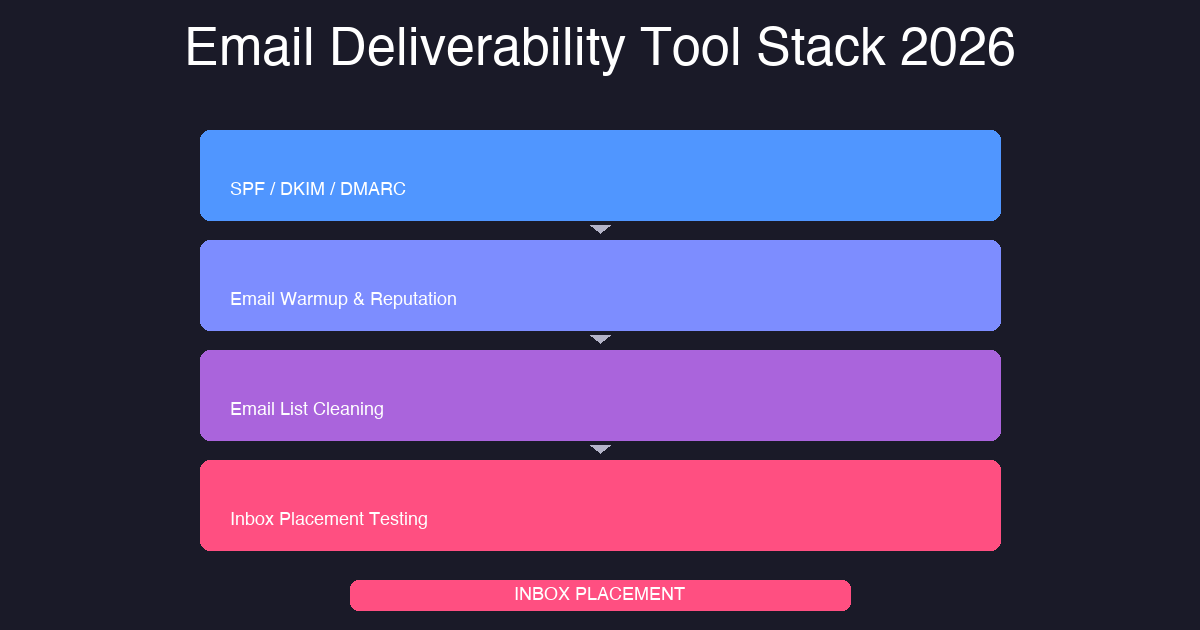
To hit 95%+ inbox placement in 2026, you need four tool categories working together: warmup (Lemwarm or Warmbox), verification (ZeroBounce), authentication (MXToolbox + EasyDMARC), and placement testing (GlockApps). Missing any layer creates a bottleneck. Our agency runs this exact stack. The tools cost less than $500 monthly. The ROI shows up in replies and revenue.
What Are Email Deliverability Tools and Why Do They Matter?
Email deliverability tools are software solutions that help your emails land in the inbox rather than the spam folder. They work across four domains: reputation building, list hygiene, authentication, and placement testing.
The math is simple. If 30% of your cold emails hit spam, you’re burning 30% of your sending budget. At 1,000 emails per day, that’s 300 dead leads daily. Over a month, you’re wasting the equivalent of a full week of outreach. Does that sound like a strategy you want to keep running?
We call this framework The Inbox Shield Protocol:
- Email warmup tools , Build domain and IP reputation before scaling
- Email verification tools , Remove invalid, disposable, and role-based addresses
- Authentication tools , Configure SPF, DKIM, and DMARC records
- Inbox placement monitoring , Test and track where your emails land
Still sending emails without this stack? Your competitors are eating your lunch.
How Do Email Warmup Tools Actually Work?
Your sending reputation is the first signal inbox providers evaluate. Email warmup accelerates the process of building that reputation before you scale outreach volume. Think of it like building credit. you don’t start with a massive loan. You start small, prove reliability, then scale.
The best warmup tools simulate natural email conversations using real inbox accounts. Fake inboxes don’t work. Inbox providers have gotten smart enough to detect synthetic engagement patterns.
New domains require 2-4 weeks minimum of warmup. If you’re sending from a domain that previously triggered spam filters, budget 6-8 weeks for recovery. We budget 3 weeks minimum for all new client domains. The investment pays dividends in inbox placement for months afterward.
How long has it been since you actually warmed up your sending domains?
What Are the Best Email Verification Tools for Cold Outreach?
A 1% hard bounce rate tanks your sender reputation. Verification eliminates those bounces before they happen. According to ZeroBounce research, verified lists see bounce rates as low as 0.5%, while unverified lists regularly hit 5-10%.
Verification tools check four things: syntax validity, domain existence, mailbox availability, and disposability risk. Any tool that only checks syntax isn’t worth your money.
Run every list through verification regardless of source. A list verified today is 5-15% cleaner than the same list from 30 days ago. We set up real-time API verification for new leads entering our CRM. Make it automatic.
what’s your current bounce rate? If you don’t know, that’s the first thing to fix.
Why Is Email Authentication Non-Negotiable in 2026?
Without proper SPF, DKIM, and DMARC records, inbox providers have no way to verify that your emails are legitimate. Authentication failures are a primary cause of spam folder placement.
SPF specifies which servers can send email on your behalf. DKIM adds a cryptographic signature proving the email wasn’t tampered with. DMARC ties both together and tells receiving servers what to do with failures.
Recommended DMARC policy: start with p=quarantine and monitor for 4-6 weeks. Move to p=reject only after you’ve verified zero legitimate emails failing authentication. Use Google’s MX checker to verify your setup.
Have you checked your authentication status in the last 30 days?
What Tools Test Where Your Emails Actually Land?
Inbox placement testing answers one question: where does your email actually land? A score below 95% indicates a deliverability problem requiring investigation.
Test before every major campaign launch. Test after any infrastructure change. Test monthly for ongoing campaigns. SendGrid’s testing guide has good frameworks for diagnosis.
When did you last test your inbox placement? Be honest.
The Complete Email Deliverability Tool Stack We Actually Use
here’s the recommended stack for agencies running serious cold outreach volume. We deploy this exact configuration for our clients:
- Lemwarm or Warmbox , Email warmup (non-negotiable for new domains)
- ZeroBounce or NeverBounce , Email verification (run every list, every time)
- MXToolbox + EasyDMARC , Authentication setup and monitoring
- GlockApps or Folderly , Inbox placement testing
This stack handles the full deliverability lifecycle. Missing any layer creates a bottleneck. We call this The Inbox Shield Protocol. Are you treating it that way?
Which tool from this stack are you currently missing?
The 6 Mistakes That Destroy Email Deliverability
Most deliverability failures trace back to a handful of avoidable mistakes:
1. Sending Too Fast
Volume spikes trigger spam filters. Start at 20-30 emails per day, scale by 20% weekly.
2. Skipping Verification
Dirty lists generate hard bounces. Hard bounces are the fastest way to destroy sender reputation.
3. Ignoring Authentication
Unauthenticated emails face automatic filtering on Gmail and Outlook. With Google’s 2024 requirements, this is no longer optional.
4. No Warmup Period
New domains need 2-4 weeks of warmup before volume scaling. Rush this and you pay the price in spam placements.
5. Low Engagement Content
High unsubscribe rates signal spam to inbox providers. Generic templates get filtered. Specific messages get delivered.
6. Single-Point-of-Failure Infrastructure
Using one sending IP for all volume creates concentration risk. Distribute across multiple IPs for volume above 5,000 emails per day.
How many of these mistakes are you currently making?
The Math That Proves Deliverability ROI
Do the math. If you send 2,000 emails per day at a 70% inbox rate, you get 1,400 effective deliveries. Raise that to 95% and you get 1,900 deliveries. At a 2% reply rate, that 30% improvement generates an additional 10 replies per day, 70 per week, 280 per month.
For a $500 average deal value, that’s $140,000 in pipeline monthly. The tools cost less than $500 per month. The ROI isn’t subtle. Cold Outreach Agency runs this stack across all client campaigns.
what’s your current inbox placement rate? If you don’t know, test it today.
Frequently Asked Questions
How long does email warmup take before sending cold outreach?
New domains need a minimum of 2-4 weeks of warmup before scaling volume. Domains that have triggered spam filters previously may need 6-8 weeks for recovery. Rushing warmup is one of the most common mistakes agencies make, and it leads directly to spam folder placement and wasted outreach budget.
Is email verification really necessary for cold outreach?
Yes. Email verification is non-negotiable. Verified lists typically see 0.5-1.5% bounce rates versus 3-8% on unverified lists. Google flags accounts with hard bounce rates above 2%, so verification protects your sender reputation.
Do I really need SPF, DKIM, and DMARC authentication for cold email?
Absolutely. Gmail and Yahoo mandated authentication requirements starting in 2024. SPF specifies which servers can send for your domain, DKIM adds a cryptographic signature to prove authenticity, and DMARC tells receiving servers how to handle authentication failures. Without these, your emails are fighting gravity.
How often should I test inbox placement for cold email campaigns?
Test before every major campaign launch, after any infrastructure changes, and monthly for ongoing campaigns. Consistent monitoring catches problems before they crater your sender reputation. If you’re not testing, you’re guessing.
Ready to Fix Your Inbox Placement?
The tools exist. The ROI is clear. The only question is whether you’ll execute.
Conclusion: Deliverability Is a System, Not a Setting
The tools outlined here are only as effective as the system you build around them. Email deliverability in 2026 rewards consistency. Warmup daily. Verify every list. Monitor continuously. Authenticate correctly.
The agencies winning at cold outreach in 2026 share one trait: they treat deliverability as a continuous investment, not a one-time setup. The tools are affordable. The ROI is measurable. The only variable is execution.
If you’re running cold outreach without this tool stack, you’re leaving reply pipeline on the table. Learn more about our cold outreach services or book a free strategy call to audit your current deliverability setup.
{
“@context”: “https://schema.org”,
“@type”: “FAQPage”,
“mainEntity”: [
{
“@type”: “Question”,
“name”: “What are the best email deliverability tools for cold outreach in 2026?”,
“acceptedAnswer”: {
“@type”: “Answer”,
“text”: “The top email deliverability tools for cold outreach in 2026 include Lemwarm or Warmbox for warmup, ZeroBounce for verification, MXToolbox and EasyDMARC for authentication, and GlockApps for inbox placement testing. Using all four categories together gives you the best chance of hitting 95%+ inbox placement rates.”
}
},
{
“@type”: “Question”,
“name”: “How long does email warmup take before sending cold outreach?”,
“acceptedAnswer”: {
“@type”: “Answer”,
“text”: “New domains need a minimum of 2-4 weeks of warmup before scaling volume. Domains that have triggered spam filters previously may need 6-8 weeks for recovery. Rushing warmup is one of the most common mistakes agencies make, and it leads directly to spam folder placement and wasted outreach budget.”
}
},
{
“@type”: “Question”,
“name”: “Is email verification really necessary for cold outreach?”,
“acceptedAnswer”: {
“@type”: “Answer”,
“text”: “Yes. Email verification is non-negotiable. Verified lists typically see 0.5-1.5% bounce rates versus 3-8% on unverified lists. Google flags accounts with hard bounce rates above 2%, so verification protects your sender reputation and keeps you out of spam filters. The ROI on verification is immediate and measurable.”
}
},
{
“@type”: “Question”,
“name”: “Do I really need SPF, DKIM, and DMARC authentication for cold email?”,
“acceptedAnswer”: {
“@type”: “Answer”,
“text”: “Absolutely. Gmail and Yahoo mandated authentication requirements starting in 2024, and by 2026, unauthenticated emails face automatic spam classification. SPF specifies which servers can send for your domain, DKIM adds a cryptographic signature to prove authenticity, and DMARC tells receiving servers how to handle authentication failures. Without these, your emails are fighting gravity.”
}
},
{
“@type”: “Question”,
“name”: “How often should I test inbox placement for cold email campaigns?”,
“acceptedAnswer”: {
“@type”: “Answer”,
“text”: “Test before every major campaign launch, test after any infrastructure changes, and test monthly for ongoing campaigns. Consistent monitoring catches problems before they crater your sender reputation. Tools like GlockApps let you see exactly where your emails land across Gmail, Outlook, Yahoo, iCloud, and Office 365. If you’re not testing, you’re guessing.”
}
}
]
}
Research worth checking
The Operator’s View
I would not scale Email Deliverability Tools until the first small batch proves three things: the market is right, the message lands, and the follow-up creates conversations. That is why I care less about volume at the start and more about whether the first replies prove the angle is real.
The person reading your message is busy, skeptical, and already filtering out vendors who sound interchangeable. In this market, vague copy dies fast. That means the message has to earn attention fast: clear pain, clean proof, and a next step that does not feel like a trap.
What Must Be True Before You Send More
- ICP match: The buyer should match your best customer profile, not just a broad industry label.
- Trigger strength: A hiring move, new location, funding event, tech change, compliance push, or public initiative makes outreach feel timely.
- Follow-up logic: Every follow-up should add a new reason to respond. Repeating the first message is not follow-up. It is noise.
This is not complicated, but it is unforgiving. A sloppy list makes copy look bad. Weak positioning makes good data useless. And a CTA that asks for a meeting too early forces the buyer to do all the mental work.
The cleaner version is simple: start with 300 accounts, not a giant scraped list. Segment them by pain, write one message for one segment, and watch replies before scaling. If that first batch does not produce signal, more volume will not save the campaign. It will only make the failure louder.
The hard truth: Email Deliverability Tools is not magic. It is a disciplined system for reaching the right buyer with the right proof at the right time. Build the data layer first, then the message, then the follow-up system. In that order.
Where This Campaign Needs Judgment
If the message cannot show why this matters now, the campaign becomes background noise. Look at Email Deliverability Tools 2026 through the buyer’s day, not through a marketer’s checklist. For Email Deliverability Tools 2026, that means the outreach has to connect the business problem, the buying moment, and the proof in a way that feels specific.
A conversion buyer cares about different proof than a personalization buyer. A hygiene bottleneck should not be handled with the same CTA as a analyst bottleneck. A manager issue needs different copy than a placement issue. This is why shallow templates fail. They flatten different buyer situations into one bland message.
- Market: Review market against the buyer’s real context before increasing send volume.
- Qualification: Review qualification against the buyer’s real context before increasing send volume.
- Objection: Review objection against the buyer’s real context before increasing send volume.
- Attribution: Review attribution against the buyer’s real context before increasing send volume.
- Stakeholder: Review stakeholder against the buyer’s real context before increasing send volume.
- Procurement: Review procurement against the buyer’s real context before increasing send volume.
This is the part a generic article usually misses: judgment. A real operator can tell when feedback is the problem, when timing is the problem, and when the whole angle is too soft. That judgment comes from reading replies, checking account quality, and comparing message intent against actual buyer behavior.
The cleaner move is to run a small batch, inspect the signal, then rewrite the weak layer. Do not scale because the copy looks polished. Scale because the replies prove the market understands the value.
